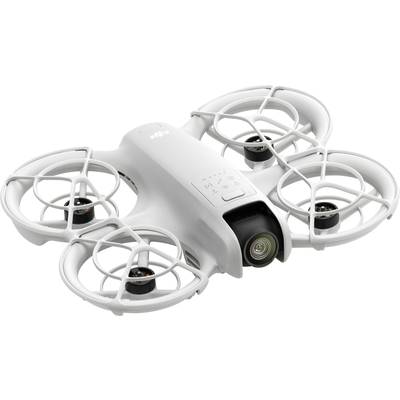
* DJI Neo does not support obstacle avoidance. To ensure flight safety, fly within a line of sight. If you want to fly outside the line of sight (BVLOS), make sure the aircraft is in good condition, the user is qualified and the flight complies with the local BVLOS regulations.
1. Product weight may vary slightly due to differences in batch material and other factors. Please refer to the actual product.
2. As of September 2024.
3. When you start and land with the palm of your hand, follow these guidelines: Fly in a calm environment where possible; stretch your palm horizontally and hold it still so that your fingers do not come into contact with the propellers to prevent injury; do not try to grab the drone while it is flying.
4. Certain control methods require the use of DJI goggles or DJI RC Motion Series products or certain DJI remote controls.
5. For some shooting modes, you must connect DJI Neo to a smartphone via Wi-Fi and activate it in the DJI Fly APP.
6. Requires the DJI Neo to connect to a smartphone via Wi-Fi.
7. DJI Neo supports voice control only in English and Chinese (Mandarin). The language used depends on the system language of the connected mobile phone (English or Chinese).
8. Tested in an open environment without interference. The range of the video transmission varies according to the operating environment.
9. Requires the purchase of a specific combo or the separate purchase of a specific remote control and goggles.
10. The video transmission distance of 10 km can only be achieved with FCC compliance. The data was measured in an unhindered, trouble-free outdoor environment and showed the widest communication range for a flight in one direction without a return flight. In actual flight scenarios, the maximum distance for video transmission is limited by the maximum flight distance of the drone. Refer to actual use.
11. 4K/30fps video recording is possible with all DJI Neo control methods. With the exception of motion control, 4K/30fps video and Horizon Balancing are supported in all other control methods. When DJI Neo is paired with DJI goggles 3 and DJI RC motion 3, it can record 16:9 4K/30fps video with rock steady/horizon balancing or 4:3 4K/30fps video without stabilization.
12. If you control Neo with your palm, with the DJI Fly APP or with a standard remote control, only Horizon Balancing is supported and cannot be turned off. If you are controlling with the DJI goggles with RC Motion or the FPV remote control, you can choose whether you want to enable Rocksteady or HorizontalBalancing or to switch off stabilization. If you control the drone without remote control or with the DJI Fly APP, the angle of HorizontalBalancing is ±30°. If you control the drone with a remote control or motion control unit, the angle of HorizonBalancing is ±45°.
13. Sold separately. Details of compatible DJI Mic 2 phone models can be found on the DJI Mic 2 product page on the official DJI website.
15. Measured after activating DJI Neo, with a fully charged battery and default settings and using the Circle, Rocket and Dronie modes. This information is for reference only.
16. Can be purchased separately or with the purchase of the DJI Neo Fly More Combo.
18. Sold separately.