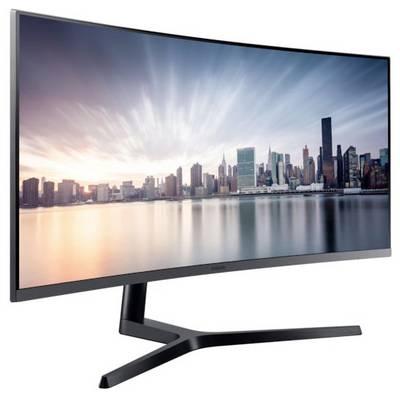
Samsung C34H890WGR LED 86.4 cm (34 inch) EEC G (A - G) 3440 x 1440 p UWQHD 4 ms HDMI™, DisplayPort, USB C®, USB A (USB 3

Samsung C34H890WGR LED
Highlights & Details
- Screen size 86.4 cm (34 inch) UWQHD, 3440 x 1440 p
- Response time: 4 ms
- Energy efficiency rating (calc): G (A - G)
- Interfaces: HDMI™, DisplayPort, USB C®, USB A (USB 3.2 1st gen), Headphone jack (3.5 mm)
- Freesync, VESA Mount 100 x 100 mm, Swivelling, Tiltable
Technical specifications
- Product type
LED
- Resolution (max.)
3440 x 1440 p
- Screen size diagonal (cm)
86.4 cm
- Screen size diagonal (inches)
34 inch
- Screen size diagonal (inches)
34 inch
- Image format
21:9
- Panel technology
VA LED
- Frame rate
100 Hz
- Response time
4 ms
- Brightness
300 cd/m²
- Contrast ratio (dyn)
3000 : 1
- Static contrast ratio
3000 : 1
- Factory colour
Black
- Interfaces
HDMI™
DisplayPort
USB C®
USB A (USB 3.2 1st gen)
Headphone jack (3.5 mm)
- No. of DisplayPort
1 x
- No. of HDMI ports
1 x
- No. of USB type A 3.0 ports
1 x
- No. of USB 3.0 ports
1 x
- Features
Freesync
VESA Mount 100 x 100 mm
Swivelling
Tiltable
- Power consumption (standby)
0.5 W
- Hor. viewing angle
178°
- Vertical viewing angle
178°
- Width
811.4 mm
- Height
538.9 mm
- Depth
298.6 mm
- Weight
7.9 kg
- Dim
(W x H x D) 811.4 x 538.9 x 298.6 mm
- Display size
33 inch - 37 inch
- Display type
LED backlit
- Display resolution mode
UWQHD
- Wall mounting option
100 x 100 mm VESA standard
G (A - G)
- Display
86.4 cm (34 inch)
- Screen resolution
UWQHD (3440 x 1440 Pixel)
- Display (cm)
86.4 cm
57 kWh/year
- Power consumption (off)
0.3 W
- Power consumption (ON)
39 W
Documents & Downloads
Datasheet
Datasheet 2358061 Samsung C34H890WGR LED 86.4 cm (34 inch) EEC G (A - G) 3440 x 1440 p UWQHD 4 ms HDMI™, DisplayPort, USB C®, USB A (USB 3

User & Safety Instructions
User & Safety Instructions 2358061 Samsung C34H890WGR LED 86.4 cm (34 inch) EEC G (A - G) 3440 x 1440 p UWQHD 4 ms HDMI™, DisplayPort, USB C®, USB A (USB 3
Warranty Terms
Warranty Terms 2358061 Samsung C34H890WGR LED 86.4 cm (34 inch) EEC G (A - G) 3440 x 1440 p UWQHD 4 ms HDMI™, DisplayPort, USB C®, USB A (USB 3
Description
Improved clarity and more detail
Ultra WQHD
With a resolution of 3440x1440, the CH890 has a pixel density of two and a half times higher than a Full HD TV and thus delivers pin-sharp images. You can see the details at a glance and view entire web pages and documents without scrolling or zooming thanks to the widescreen view.
One monitor for everything
The 34" wide CH89 Curved monitor is ideal for multitasking, which requires a lot of screen space for various tasks and tasks without having to use a second screen. With the ultra-wide display you can experience truly seamless single-monitor multitasking.
PBP dual-screen function
Samsung's image-to-image capabilities allow you to connect two different devices at the same time without sacrificing image quality.
PIP sub-screen display
The picture-in-picture capability allows you to do without a second screen, even when multitasking. You can scale the second image up to 25% of the original size and position it anywhere on the screen.
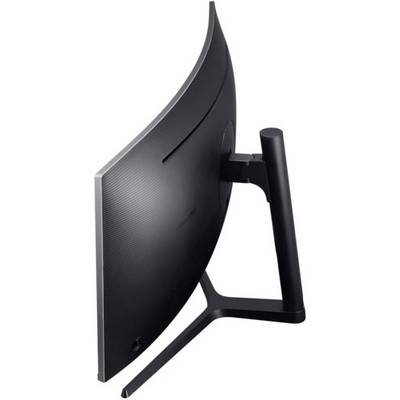
For your convenience, 1800R screen curvature
The CH890 is designed to adapt to the natural curvature of the human eye, providing comfort and an immersive viewing experience. With Samsung flicker-free technology and eye protection mode, you can protect your eyes from fatigue.
USB Type-C – the ultimate hubultimate connectivity with a single cable
The USB Type C port provides power, data can be sent, and signals are displayed between multiple devices via a single connection. A single connection architecture allows you to enjoy a work environment that is both trouble-free and stress-free.
Re-use USB 3.0 ports
In addition to a permanently assigned USB-type C port for each computer, including your MacBook or mobile device, you can also use your USB 3.0 ports for various peripherals without the need for additional hubs.
Expand your capabilities
Experience your Samsung S8 or Note8 in a completely new way, by connecting it with a Samsung USB type-C monitor without complicated installations via hubs or apps. The larger screen provides greater enjoyment and productivity, especially when sharing content, at work or simply at home.
Seamless discovery of devices
Automatic Source Switch allows the monitor to automatically detect newly connected devices and then use the correct signal. Now you do not have to select the correct input source in the menu.
Use your monitor efficiently
Swiveling, tilting, rotating and height-adjustable - through the VESA support the monitor can also be fixed on walls or on separate brackets. With these features, you can easily position your monitor at any height and angle and share it with your employees.
Performance meets beauty
The CH890 has a slim shape, is almost frameless on three sides and has a graceful, height-adjustable Y-stand. The clean, black design includes a flap and stores the cables neatly.
Multi-tasking hohemEasy Setting Box B/W.
With the Easy Setting Box you can easily share your display, or attach several displays with different sizes in different positions. With the CH890, you can solve the daily challenges in your labor-intensive environment with ease.
This text is machine translated.
Scope of delivery
- Cable
- Quick guide.
What kind of Monitors are you looking for?
- 120Hz monitor
- 144 Hz monitor
- 165 Hz monitor
- 180 Hz monitor
- 32" monitor
- 34" monitor
- 4K monitor
- 5K monitor
- 60 Hz monitor
- Apple Studio Display
- Arropa monitor
- Asus monitor
- Dell monitor
- EIZO monitor
- Freesync monitor
- Full HD monitor
- Gaming PC monitors
- HDMI monitor
- Height-adjustable monitor
- HP monitor
- IPS panel
- LC Power monitor
- LCD monitor
- LED monitor
- Monitor and speaker
- Monitor and webcam
- PC curved monitor
- PC monitor 24"
- PC monitor 27"
- Pivoting monitor
- QHD monitor
- UHD monitor
- Ultrawide Monitors
- USB-C monitor
- UWQHD monitor
- ViewSonic monitor
- WQHD monitor