

• All things technology
  • Delivery within Europe
  • Right to Cancel applies
  • Specialist retailer since 1923

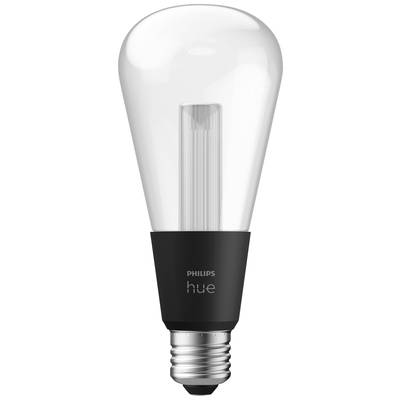
Philips Hue LED light bulb 929003151501 EEC: G (A - G) Hue LG ST72 E-27 6.8 W

1/9
Datasheet (PDF)
EAN:
Part number:
Item no:
Fast track dispatch on Thu 29 Oct

2 Piece(s)
Sales and shipping:
Conrad ElectronicTerms & Conditions

Number
Total (€ 91.99 / piece)
€ 91.99
prav.tax.untaxed incl. VAT 
plus € 19.99 
prav.priceAvailability.ecoparticipation.cost ...
prav.priceAvailability.privatecopyingfee.cost ...
without further shipping costs 
Only 2 Piece(s) available
14-day return policy included

Highlights & Details

Philips hue white and Col Amb. LightGuide Giant Edison ST72 E27

  • Power rating (light bulbs)=6.8 W
  • Luminous flux (light bulbs)=500 lm
  • Base=E-27
  • 'Works with Amazon Alexa' next to a blue Echo symbol, indicating compatibility with Amazon Alexa features.
  • Logo of Google Assistant with the words 'Google Assistant' next to it. A blue, red, yellow, and green dot symbolise the assistant.

Technical specifications

Product type

LED light bulb

E-27

6.8 W

Google Home

Alexa

G (A - G)

Energy consumption

7 kWh/1000h

Data exchange

Bidirectional (bi)

Yes

Transfer Standard (Smart Home)

ZigBee

Bluetooth

Weight

0.13 kg

Factory colour

Transparent

Globe shape

Bulb type

LED (monochrome)

Total luminous flux

500 lm

500.00 lm

Height

168 mm

(Ø)

72 mm

Radiation angle

0°

UKCA

yes

Documents & Downloads

Datasheet

Datasheet 3218978 Philips Hue LED light bulb 929003151501 EEC: G (A - G) Hue LG ST72 E-27 6.8 W

User & Safety Instructions

User & Safety Instructions 3218978 Philips Hue LED light bulb 929003151501 EEC: G (A - G) Hue LG ST72 E-27 6.8 W

Description

Brighten up your daily moments with smart lighting of Philips hue. Relax, watch TV, support your daily routine and feel safe in your home – with Philips Hue you can experience more.
The Philips hue LightGuide were developed in order to be seen! The distinctive inner tube and reflective glossy surface gives the LightGuide its extraordinary effect. Each LightGuide is mouth-blown from crystal clear glass, combining modern technology with traditional craftsmanship. Choose from 16 million colors and different cool to warm white tones to create the right mood for every moment. With this system you can use Bluetooth for instant light control in a room or connect the Hue bridge control to enjoy the full range of functions of your Philips Hue lighting system anywhere in your home and get even more out of your smart lights.

With the Hue Bridge available separately, you can control up to 50 Hue bulbs and indoor and outdoor lights simultaneously and use many more features:
Simulate your presence by controlling your light from the traveling, no matter where you are at the moment
Adjust your light to your daily routine by setting automated routines and creating your own lighting scenes
Experience maximum entertainment by synchronizing your light with films, games and music

This text is machine translated.

Features

  • Modern smart lamp, which is suitable for decorative purposes Ideal
  • Unique light experience with Sparkle effect
  • Warm and cold white light and 16 million colors provide perfect light in any situation
  • Easy dimming of the laser beam for optimum moments of relaxation using the Hue APP, switches, sensors and voice (e.g. Amazon Alexa, Google HOME)

Hints

Using Philips Hue for the first time?
Philips Hue lighting control requires A) a Philips Hue Wireless Dimming kit. An easy and very straightforward way is connecting your Philips Hues light to a Philips Hues switch. B. Using the Philips Hue Bridge together with the Philips Hue app gives you the full connectivity experience. There are two ways of getting your hands on a Philips Hue Bruidge. (1) Buy one of the starter kits that includes Bridge and lights. (2) Buy a standalone Bridge, use it as main hub, and assemble your very own Philips Hue system.
Setup:
Smartphone/tablet and router required. Screw in the bulbs. Connect Bridge to mains supply (PSU included). Hook up the Bridge to your router (LAN cable included). Download and install app. Follow the guidelines. Lights are automatically added and can be controlled via the app.

More interesting products

(*All information is plus legal VAT)