• All things technology
  • Delivery within Europe
  • Right to Cancel applies
  • Specialist retailer since 1923

Dell U3224KBA UltraSharp LED EEC G (A - G) 80 cm (31.5 inch) 6144 x 3456 p 16:9 5 ms HDMI™, Mini DisplayPort, USB C® (US

1/9
EAN:
Part number:
Item no:
Unavailable

Sales and shipping:
Conrad ElectronicTerms & Conditions

Total (€ 2,365.00 / piece)
€ 2,365.00
prav.tax.untaxed incl. VAT 
plus € 19.99 
prav.priceAvailability.ecoparticipation.cost ...
prav.priceAvailability.privatecopyingfee.cost ...
without further shipping costs 
14-day return policy included

Highlights & Details

Dell U3224KBA UltraSharp LED

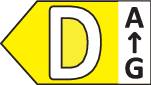
  • Screen size 80 cm (31.5 inch) 6K, 6144 x 3456 p;Response time: 5 msEnergy efficiency rating (calc): G (A - G)
  • Interfaces: HDMI™, Mini DisplayPort, USB C® (USB 3.2 2nd gen), USB A (USB 3.2 2nd gen), RJ45, Thunderbolt 4;Portrait view, Ethernet connection, HDR, Height adjustable, Built-in speakers, Built-in microphone, Built-in webcam, Kensington lock, Tiltable, Pivoted, Swivelling, USB docking station, VESA Mount 100 x 100 mm

Technical specifications

  • Interfaces (details): HDMI (up to 6144 x 3456 at 60 Hz / HDCP 2.2), Mini DisplayPort 2.1 (up to 6144 x 3456 at 60 Hz / HDCP 2.2), USB-C (up to 140 W), 4 x USB 3.2 Gen 2, LAN (RJ-45), USB 3.2 Gen 2 downstream with battery charging 1.2, 2 x USB-C 3.2 Gen 2 downstream (up to 15 W), Thunderbolt 4/USB-C 3.2 Gen 2 upstream/DisplayPort 1.4 (up to 140 W), Thunderbolt 4 downstream (for daisy-chain, power up to 15 W)
  • Webcam sensor resolution 8 megapixel
  • Webcam - max. Video resolution 3840 x 2160 at 30 fps
  • Webcam - Digital Zoom: 5x
  • Webcam - features: 78° field of view, 90° field of view, 65° field of view, compatible with Windows Hello, up to 5 m focal distance
Product type

LED

Resolution (max.)

6144 x 3456 p

Screen size diagonal (cm)

79.94 cm

Screen size diagonal (inches)

31.5 inch

Screen size diagonal (inches)

31 inch

Image format

16:9

Panel technology

IPS LED

Touchscreen (display)

No

Frame rate

60 Hz

Response time

5 ms

Brightness

450 cd/m²

Contrast ratio (dyn)

2000 : 1

Static contrast ratio

2000 : 1

Pixel density (PPI)

223

Dot pitch

0.114 mm

Factory colour

Silver

Interfaces

HDMI™

Mini DisplayPort

USB C® (USB 3.2 2nd gen)

USB A (USB 3.2 2nd gen)

RJ45

Thunderbolt 4

No. of HDMI ports

1 x

No. of MiniDPs

1 x

No. of Thunderbolt IFs

2 x

No. of USB 3.2 2nd Gen (USB 3.1)

5 x

No. of USB 3.0 ports

3 x

Features

Portrait view

Ethernet connection

HDR

Height adjustable

Built-in speakers

Built-in microphone

Built-in webcam

Kensington lock

Tiltable

Pivoted

Swivelling

USB docking station

VESA Mount 100 x 100 mm

Show more
Audio power (max.)

14 W

Inclination

-5/+21

Adjustable height

160 mm

Angular position

180°

Swivel angle

90°

Hor. viewing angle

178°

Vertical viewing angle

178°

Screen coating

Anti-glare

Curved monitor

No

HDR support

Yes

HDR format

HDR10

HDR-certified

VESA DisplayHDR 600

Width

717.42 mm

Height

522.63 mm

Depth

237 mm

Weight

13.3 kg

Power supply (details)

Alternating current 100-240 V (50/60 Hz)

Dim

(W x H x D) 717.42 x 522.63 x 237 mm

Screen size/position settings

Swivel

Height

Tilt

Pivoting (rotation)

Pivoting

Display size

30 inch - 32 inch

Display type

IPS Black

Range of uses

Office

Home

Display resolution mode

6K

Wall mounting option

100 x 100 mm VESA standard

G (A - G)

Display

80 cm (31.5 inch)

Screen resolution

6K (6144 x 3456 Pixel)

Display (cm)

80 cm

Power consumption (off)

0.25 W

Power consumption (ON)

56.73 W

Standby consumption

0.26

UKCA

yes

Documents & Downloads

User & Safety Instructions

User & Safety Instructions 3351618 Dell U3224KBA UltraSharp LED EEC G (A - G) 80 cm (31.5 inch) 6144 x 3456 p 16:9 5 ms HDMI™, Mini DisplayPort, USB C® (US

Description


A clearer picture

To the smallest detail, this 79.94 cm (31.5") monitor with impressive high 6K resolution and 223 ppi offers up to 156% more pixels compared to a 4K monitor, so you can see more and be more productive. VESA DisplayHDR™ 600 lets your work shine in brilliant colors. For professional use for editing video and graphics images.

Vibrant, natural colors: Enjoy 1.07 billion colors and a wide range of colors according to industry standards, including 99% DCI-P3 and 99% Display P3.

Superior picture quality: The world's first 6K monitors with IPS black panel technology offer deeper blacks, more accurate shades of gray and exceptional contrast (2000:1) over a wide viewing angle.

Impressive connectivity. Increased productivity.

Faster connection: With a single Thunderbolt™ 4 cable you can reduce the cable clutter on the desk and get fast transfer rates of up to 40 Gbit/s and up to 140 W power for your PC.

Advanced connectivity: Connect to more devices HER with mini-DisplayPort 2.1, HDMI 2.1, USB-A and USB-C ports that offer speeds of up to 10 Gbps.

Top productivity: Connect the monitor to two PC sources and the Auto KVM function smoothly transfers the control to the second connected PC. Via KVM-functions (keyboard, video and mouse) you can control both PCs with a single keyboard and mouse. Easily display content from two PC sources with Picture-by-Picture and Picture-in-Picture features.

Stable connection: Enable fast Ethernet with speeds of up to 2.5 GbE.

Nondisruptive: With the RJ45 lock function you can flexibly connect the wired Ethernet to a selected PC and continue to work with two PC inputs

Leave a lasting impression

Webcam with built-in Sony STARVIS™ CMOS 4K sensor, so you'll always look good. Enjoy with Digital Overlap HDR and 3D-/2D-video noise suppression even in poor or poor light conditions real colors and a higher picture quality without motion blur.

Excel in picture and sound

Perfect image alignment: AI Auto Framing 2.0 offers improved camera transitions that better track motion and image boundaries.

Safe interactions: SafeShutter automatically switches your camera on and off at the touch of a button.

On-site collaboration: Enjoy clear communication thanks to built-in microphone with noise and echo suppression and two 14 W speakers.

Style meets function

Easy to connect: Quickly and easily plug accessories and devices into the front USB A and USB C-pop-up connectors. These are retracted when not in use, so that the monitor closes flush.

Eye-friendly: The always active, integrated ComfortView Plus reduces blue-light emissions without impairing the color reproduction, so that your eyes are not strained.

Individual view: By tilting, swiveling, rotating and height adjustment you can adjust the height and alignment of the monitor as per your requirements.

Easy sign-in: As you approach your monitor, Dell ExpressSign-in detects your presence and logs you in.

Easy management Productivity at a new level

Improved productivity: Bring order to your screen, adjust your layout and easily navigate for efficient multitasking.

Modern intuitive user interface: New modern and user-friendly user interface and personalized functions with Menu Launcher.

Productive at all levels: With EasyArrange to arrange several applications on one or more screens with 48 preset window partitions simply side by side and adjust up to five windows individually - thus multi-tasking is possible.

Enhanced viewing experience: Enjoy a consistent, seamless color experience on your monitor by matching the monitor's color preset and supported ICC profile.

Easy setup and sharing of accessories: Set up a single keyboard and mouse to use it easily for multiple PCs with the USB KVM Wizard. Switch between PCs quickly and comfortably using the quick-access menu or the hotkey.

Easy to deploy: Dell display manager is compatible with management tools such as SCCM, Intune, and command line interface scripts, enabling easy IT integration and deployment with asset management.

The environment at a glance. Today and in the future.

Environmentally friendly manufacturing: This monitor is made from 85% recycled plastic and 90% recycled aluminum.

Environment-conscious packaging: Dell monitors are supplied in 90% recyclable cardboard packaging to protect the environment.

Energy efficient: PowerNap , a feature that darkens the screen or puts it into sleep mode when not in use, saves power. With the Power Sync function your laptop switches on when you turn the monitor on.

This text is machine translated.

Scope of delivery

  • Cable
  • Quick guide.

More interesting products

(*All information is plus legal VAT)