• All things technology
  • Delivery within Europe
  • Right to Cancel applies
  • Specialist retailer since 1923

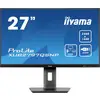
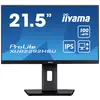
Iiyama ProLite XUB2797QSNP-B1 LCD EEC E (A - G) 68.6 cm (27 inch) 2560 x 1440 p 16:9 1 ms HDMI™, DisplayPort, Headphone

Eco
1/8
Datasheet (PDF)
EAN:
Part number:
Item no:
Unavailable

Sales and shipping:
Conrad ElectronicTerms & Conditions

Pre-contractual information under the EU Data Act

Highlights & Details

Iiyama ProLite XUB2797QSNP-B1 LCD

  • Screen size 68.6 cm (27 inch) QHD, 2560 x 1440 p;Response time: 1 msEnergy efficiency rating (calc): E (A - G)
  • Interfaces: HDMI™, DisplayPort, Headphone jack (3.5 mm), USB A (USB 3.2 1st gen), RJ45, USB C®;Blue light reduction, Flicker-free technology, Kensington lock, Headphone jack, Tiltable, Built-in speakers, Portrait view, Height adjustable, Swivelling
  • The image displays the EPEAT logo, consisting of a green check mark and the word 'epeat' on a light green background, indicating environmental certification.

Technical specifications

Product type

LCD

Resolution (max.)

2560 x 1440 p

Screen size diagonal (cm)

68.5 cm

Screen size diagonal (inches)

27 inch

Screen size diagonal (inches)

27 inch

Image format

16:9

Panel technology

IPS LCD

Frame rate

100 Hz

Response time

1 ms

Brightness

300 cd/m²

Contrast ratio (dyn)

80000000 : 1

Static contrast ratio

1300 : 1

Dot pitch

0.233 mm

Factory colour

Black

Interfaces

HDMI™

DisplayPort

Headphone jack (3.5 mm)

USB A (USB 3.2 1st gen)

RJ45

USB C®

No. of DisplayPort

1 x

No. of HDMI ports

1 x

No. of USB 3.2

3 x

No. of USB 3.0 ports

1 x

Features

Blue light reduction

Flicker-free technology

Kensington lock

Headphone jack

Tiltable

Built-in speakers

Portrait view

Height adjustable

Swivelling

Audio power (max.)

4 W

Inclination

-5/+23

Adjustable height

150 mm

Angular position

90°

Swivel angle

90°

Power consumption (standby)

0.5 W

Hor. viewing angle

178°

Vertical viewing angle

89°

Screen coating

Matt

Adaptive-sync technology

AMD FreeSync

Width

614 mm

Height

550 mm

Depth

210 mm

Weight

6.1 kg

Power supply (details)

100 - 240 V

Dim

(W x H x D) 614 x 550 x 210 mm

Screen size/position settings

Tilt

Height

Pivoting (rotation)

Pivoting

OSB languages

English

German

French

Italian

Polish

Russian

Spanish

Dutch

Japanese

Czech

Display size

24 inch - 29 inch

Display type

LED backlit

Range of uses

Office

Home

Display resolution mode

QHD

Wall mounting option

100 x 100 mm VESA standard

E (A - G)

Display

68.6 cm (27 inch)

Screen resolution

QHD (2560 x 1440 Pixel)

Display (cm)

68.6 cm

22 kWh/year

Power consumption (off)

0.3 W

Power consumption (ON)

26 W

UKCA

yes

Eco badge reference

EPEAT

Documents & Downloads

Datasheet

Datasheet 3221492 Iiyama ProLite XUB2797QSNP-B1 LCD EEC E (A - G) 68.6 cm (27 inch) 2560 x 1440 p 16:9 1 ms HDMI™, DisplayPort, Headphone

User & Safety Instructions

User & Safety Instructions 3221492 Iiyama ProLite XUB2797QSNP-B1 LCD EEC E (A - G) 68.6 cm (27 inch) 2560 x 1440 p 16:9 1 ms HDMI™, DisplayPort, Headphone

Description

Discover the XUB2797QSNP, a 27" (68.5 cm) monitor with WQHD IPS technology, equipped with USB-C dock, KVM switch and RJ45 for LAN connectivity. The KVM switch allows multiple computers to be connected from a single workstation. Free yourself from the annoying cable mess with the USB-C dock, through which all data (audio and video) are transferred, while your laptop is supplied with power. Expand your desktop easily by setting up a Dual monitor setup with the display port output. Enjoy precise colors and large viewing angle thanks to the IPS panel. Benefit from an exceptional display in applications such as photography and web design thanks to WQHD resolution and high contrast. The ergonomic base offers height adjustment of 150 mm and tilt/swivel function for the vertical format mode and optimizes the comfort while working with extensive data.

USB-C dock
The USB-C dock allows you to connect a laptop* to the monitor with a single cable. All data is transferred extremely fast, while you supply and charge your device at the same time. Via additional USB ports, PC mouse, keyboard or a webcam can also be connected to the monitor. Enjoy the order on your desk and avoid an annoying cable mess. *Features vary depending on your laptop's USB-C support.

KVM SWITCH
The KVM switch function on your monitor allows you to share connected devices via USB dock with two different computers. Simply change the signal input in the OSD menu of the monitor and your keyboard, mouse and webcam changes immediately from your notebook to your PC.

IPS technology
The IPS displays are mainly known for wide viewing angles and natural, highly accurate colors. They are particularly suitable for color-critical applications.

WQHD
With WQHD resolution (2560x1440p) your monitor is ready to display high-resolution pictures. This means that you can store more information on your screen, i.e. over 76% more than a monitor with full HD resolution (1920x1080).

FLICKER-FREE + BLUE LIGHT TECHNOLOGY
The ultimate solution for a pleasant working and well-being of your eyes. Flicker-free monitors with blue-light reduction function considerably reduce the strain and fatigue of the eyes due to their image refresh rate and radiated blue light as compared to conventional monitors.

This text is machine translated.

Scope of delivery

  • Cable
  • Quick guide.

Hints

HDMI™ is a registered trademark of HDMI Licensing, LLC.