• All things technology
  • Delivery within Europe
  • Right to Cancel applies
  • Specialist retailer since 1923

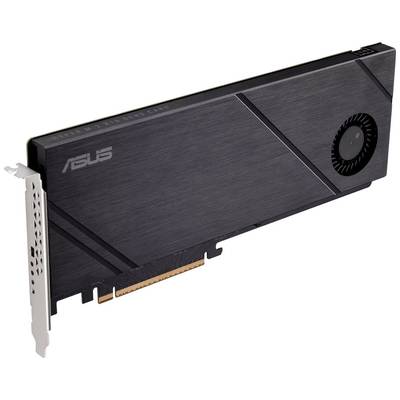
Asus Hyper M.2 x16 Gen5 Card M.2 controller PCIe x16 Compatible with: 2242, 2260, 2280 Active cooling

1/6
EAN:
Part number:
Item no:
Fast track dispatch on Wed 4 Nov

2 Piece(s)
Sales and shipping:
Conrad ElectronicTerms & Conditions

Number
Total (€ 87.99 / piece)
€ 87.99
prav.tax.untaxed incl. VAT 
plus € 19.99 
prav.priceAvailability.ecoparticipation.cost ...
prav.priceAvailability.privatecopyingfee.cost ...
without further shipping costs 
Only 2 Piece(s) available
14-day return policy included
Pre-contractual information under the EU Data Act

Highlights & Details

Asus Hyper M.2 x16 Gen5 Card - interface adapter

  • The Asus Hyper M.2 x16 Gen5 card (PCIe 5.0/4.0) supports up to four NVMe M.2 devices (2242/2260/2280/22110) at up to 512 Gbps for RAID functions on different CPU platforms.
  • 1 x 6-pin PCIe power connector and two-phase power supply solution with up to 14 watts of power to support the latest NVMe drives.
  • Large heatsink and active fan reduce M.2 SSD temperatures for unthrottled transfer speeds and improved reliability; an additional fan cable is connected to the fan connector on the motherboard so that the motherboard can control and regulate fan speed.
  • The customized server-quality PCB supports up to four PCIe 5.0/4.0 M.2 drives with up to 512 Gbps bandwidth for smooth data transfer.

Technical specifications

  • PCIe 5.0 x16 interface supports data transfer rates up to 512 Gbps
  • Slots: 4 x M.2 slots (Key M), Type 2242/2260/2280/22110 (supports PCIe 5.0)* (* Supports PCIe M.2 storage devices only.)
  • 1 x M.2-Fan mains switch
  • 4 x M.2 access LEDs
  • Active fan with heat sink, supports the fan control via the fan header of the MB enclosure
  • Dimensions (LxWxH): 290x122x15 mm
Product type

M.2 controller

Slot

PCIe x16

Compatible with

2242

2260

2280

Power supply

via PSU

Specs

Active cooling

Form factor

Mini-ATX

#####Intel® 1700

UKCA

yes

Documents & Downloads

User & Safety Instructions

User & Safety Instructions 3045570 Asus Hyper M.2 x16 Gen5 Card M.2 controller PCIe x16 Compatible with: 2242, 2260, 2280 Active cooling

Description


Supports the RAID function
The Asus Hyper M.2 x16 Gen5 card can support RAID functions on different CPU platforms. For ultimate flexibility, unused CPU PCIe lanes can be allocated to memory to create a bootable RAID array with up to four M.2 SSDs*.

One card, 8 times bandwidth
The Asus Hyper M.2 x16 Gen5 card uses PCIe 5.0, while WAS offers twice the bandwidth per lane compared to PCIe 4.0. With four M.2 slots, it provides a bandwidth of up to 512 Gbps per card – eight times the bandwidth of a single PCIe 4.0 drive.

Improved cooling
The Asus Hyper M.2 x16 Gen5 card not only improves hardware, but also includes advanced software solutions for efficient heat management that effectively discharges heat to keep SSDs at the optimal temperature for unshakable performance.

Effective thermal solution
A heat sink with full cover that is attached to the M.2-SSD and has an air duct and fan-style fan. In addition, the four M.2 slots are supported by heat conduction pads on the top and bottom to reduce temperature-related throttling during intensive, sustained data transfers.

Fan Xpert4 support
The integrated active fan in blower style can be easily connected to the fan connection of the motherboard casing, so that users can adjust the fan speed in the Asus fan Xpert 4.

Developed for unthrottled transfer speeds
The Asus Hyper M.2 x16 Gen5 card has four M.2 slots – which support both PCIe 5.0 and 4.0 – that allow users to add to it. The card was developed for NVMe SSD drives and has a stable power supply, which delivers up to 14 watts of power per drive. The card also supports RAID capabilities over four M.2 slots and offers bandwidth up to 128 GT/s per M.2 slot.

This text is machine translated.

Hints

*M.2 SSD support depends on CPU and motherboard design. Please check the specifications and the user manual of your motherboard. Upgrade to the latest BIOS and set the PCIe bifurcation settings before using the NVRAM RAID feature.

Accessories

(*All information is plus legal VAT)

The necessary accessories are required to use the article as described.