• All things technology
  • Delivery within Europe
  • Right to Cancel applies
  • Specialist retailer since 1923

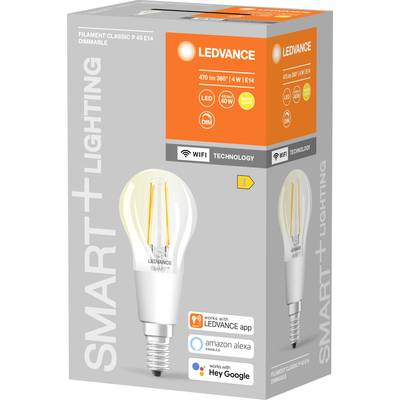
LEDVANCE LED light bulb EEC: E (A - G) 4058075609778 E14 4 W Warm white

1/3
Datasheet (PDF)
EAN:
Part number:
Item no:
Unavailable

Sales and shipping:
Conrad ElectronicTerms & Conditions

Total (€ 13.99 / piece)
€ 13.99
prav.tax.untaxed incl. VAT 
plus € 19.99 
prav.priceAvailability.ecoparticipation.cost ...
prav.priceAvailability.privatecopyingfee.cost ...
without further shipping costs 
14-day return policy included

Highlights & Details

SMART WIFI P40D 4W/827 230VFILCL E14X1 LEDV

  • Power= 4 W Total luminous flux= 470 lm Colour temperature= 2700 K Warm white

Technical specifications

Product type

LED light bulb

E14

Colour

Warm white

E (A - G)

Energy consumption

4.00 kWh/1000h

Radiation angle

300°

Operating voltage

230 V

Yes

Recess width

35 mm

80 Ra

Weight

26 g

Factory colour

Transparent

Content

1 pc(s)

Light features

App-enabled

15000 h

4 W

2700 K

Total luminous flux

470 lm

Material

Glass

Length

118 mm

(Ø)

35 mm

IP20

UKCA

yes

Documents & Downloads

Datasheet

Datasheet 2475057 LEDVANCE LED light bulb EEC: E (A - G) 4058075609778 E14 4 W Warm white

Description

Features

  • Network protocol: WiFi
  • Dimmable
  • Service life: Up to 15,000 hours
  • Wireless control via app
  • Easy to install and use
  • Contains no mercury
  • General lighting
  • Living spaces
  • Trade (hotels, bars, boutiques, etc.)
  • Outdoor applications only in suitable lamps

Hints

Using Philips Hue for the first time?
Philips Hue lighting control requires A) a Philips Hue Wireless Dimming kit. An easy and very straightforward way is connecting your Philips Hues light to a Philips Hues switch. B. Using the Philips Hue Bridge together with the Philips Hue app gives you the full connectivity experience. There are two ways of getting your hands on a Philips Hue Bruidge. (1) Buy one of the starter kits that includes Bridge and lights. (2) Buy a standalone Bridge, use it as main hub, and assemble your very own Philips Hue system.
Setup:
Smartphone/tablet and router required. Screw in the bulbs. Connect Bridge to mains supply (PSU included). Hook up the Bridge to your router (LAN cable included). Download and install app. Follow the guidelines. Lights are automatically added and can be controlled via the app.

System requirements

  • Google Assistant | Amazon Alexa