• All things technology
  • Delivery within Europe
  • Right to Cancel applies
  • Specialist retailer since 1923

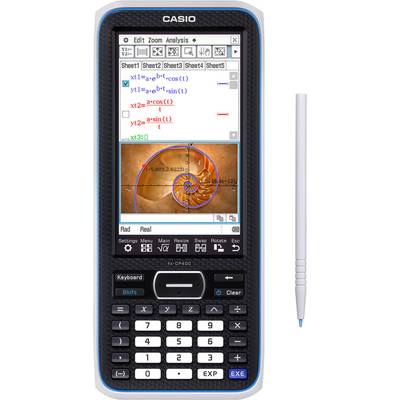
Casio FX-CP400 Graphing calculator Black Display (digits): 25 battery-powered (L x W x H) 206 x 89 x 21.1 mm

1/39
EAN:
Part number:
Item no:
Fast track dispatch on Thu 29 Oct

29 Piece(s)
Sales and shipping:
Conrad ElectronicTerms & Conditions

Number
Total (€ 174.99 / piece)
€ 174.99
prav.tax.untaxed incl. VAT 
plus € 19.99 
prav.priceAvailability.ecoparticipation.cost ...
prav.priceAvailability.privatecopyingfee.cost ...
without further shipping costs 
14-day return policy included

Highlights & Details

Graphing calculator FX-CP400 Black

  • Computer algebra system
  • 3D Graph
  • Virtual keyboard
  • Interactive differential calculation
  • Pinch-in/out (finger zoom)
  • Symbol menu for selecting the mode
  • Touch-sensitive touch display for use with finger or pen
  • Direct functional connection of the applications via icon selection
  • Selection of specified mathematical expressions for entering the coefficients
  • Rotating and divisible screen

Technical specifications

  • 5.5 MB Flash-ROM memory, 24 MB USB flash memory
  • Dim. (WxHxD) 89 x 206 x 21 mm
  • Menu languages: German, English, Spanish, French, Finnish
Product type

Graphing calculator

Display type

Colour dot matrix touch display

Display (digits)

25

Factory colour

Black

Features

Dustproof

Width

89 mm

Height

21.1 mm

Depth

206 mm

Power supply (LOV)

battery-powered

Power supply

AAA battery (4x), included

Dim

(L x W x H) 206 x 89 x 21.1 mm

Weight

320 g

Type

fx-CP400

Displays

Color touch display 320 x 528 pixels, 16-line

Length

206 mm

UKCA

yes

Documents & Downloads

User & Safety Instructions

User & Safety Instructions 2383848 Casio FX-CP400 Graphing calculator Black Display (digits): 25 battery-powered (L x W x H) 206 x 89 x 21.1 mm

Description

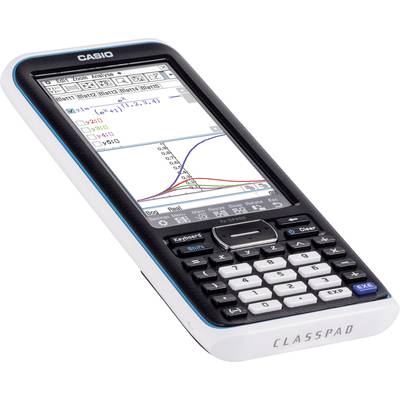
Graphic computer with computer algebra system and high-resolution as well as touch-sensitive color display. The newest model of the ClassPad series offers an intuitive operation and provides for a clear mathematical instruction.

This text is machine translated.

Features

  • High resolution, large color display with 12.2 cm screen size and a resolution of 320 x 528 pixels
  • Touch-sensitive touch display for use with finger or pen
  • Pinch-in/out (finger zoom)
  • Use of standard batteries ensures smooth testing
  • Very fast start time
  • Intuitive operation through PC-like menu structure
  • Interactive linking of different application areas
  • Rotating screen in the main and graphics application as well as in the spreadsheet
  • Interactive differential calculation
  • 3D Graph
  • Virtual keyboard with mathematical functions, letter keyboard, special characters and selection catalog of all commands
  • Software that can be updated
  • Division of the screen into 2 application windows for the use of various editing functions such as drag&drop, copy&paste, etc. via pen operation
  • Direct functional connection of the applications via icon selection (one-touch)
  • Natural mathematical notation
  • Selection of specified mathematical expressions for entering the coefficients
  • Symbol menu for selecting the mode
  • Interfaces to PC via USB cable and computer-to-computer via 3-pin cable (included)
  • Numerical and algebraic calculation:
  • Fraction calculation with “one-touch” conversion between fraction and decimal representation
  • Use all mathematical functions such as √x, ∫x, log, ∑, e, X-¹, etc. using the virtual keyboard for numerical and algebraic calculations
  • Calculations in degrees and radians
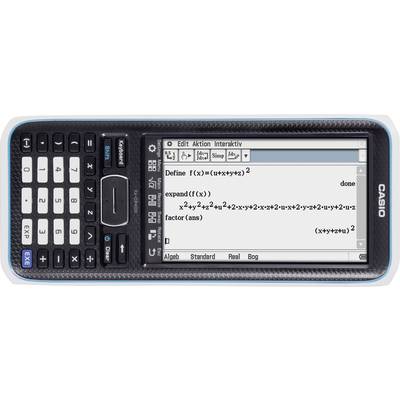
  • Algebraic calculation with commands such as factor, expand, simplify, approx, combine, collect, etc.
  • Calculation with complex numbers
  • Convert sexagesimal to decimal and inverse
  • Random number generator, permutation, combinatorics
  • Vector calculation: Calculating scalar and cross product
  • Matrix calculation: Create matrices in mathematical notation, supplement rows and/or columns, determinant, transpose, own vector, own value
  • Laplace transformation
  • Fourier transform
  • EActivities:
  • E-activities can be used by the teacher as a documentation tool for electronic examples and practical problems with accompanying text, mathematical formulas, 2- and 3-D graphics, geometric drawings, dynamic geometry links and tables
  • Likewise, e-activites can act as and be used as a "workbook" for students to examine problems and document their learning outcomes, or to solve problems through notes or notes, and to save their work to a file
  • E-activities thus combine text lines, calculation lines, dynamic geometry links and all application menus like a text task in the classic textbook: Descriptive text, use all applications by inserting named "link strips" and dynamic geometry links as well as additional note functions
  • Statistics:
  • (Two-dimensional) descriptive statistics for the calculation of mean values, standard deviation, estimated values, etc.
  • Regression analyzes: Linear, square, cubic, quartic, log., EXP., power, sine and logist. Regression with graphical representation of statistical data and regression graphs
  • (Two-dimensional) evaluation statistics for the calculation of probabilities such as normal, binomial, Poisson distribution, various test methods such as □, Z, t tests and intervals
  • Graphics and tables:
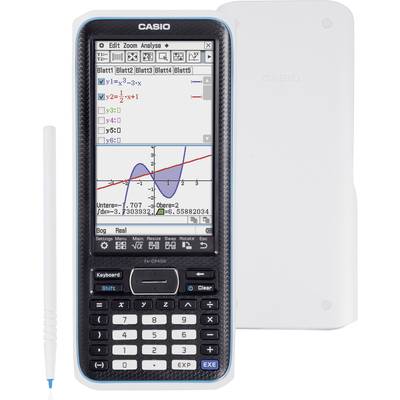
  • Graphic representation of Cartesian, polar, parametric functions as well as inequalities
  • Graphical analysis with trace, plot (courses, text, tangent, normal, Circle, etc.), zoom functions as well as manual movement of the graphics window
  • Graphical determination and resolution of zero points, maximum, minimum, intersection, turning points (curve discussion)
  • Modify graphics
  • Adaptation of graphs to background images (special photo format)
  • Generate value tables based on the function stars entered
  • Generate overview tables with lead values based on the function stars entered
  • Number sequences:
  • Recursive representations of number sequences: Ordered number pair, arithmetic and geometric numerical sequences, progression of differences, Fibonacci
  • Selection of table types that automatically calculates the difference, quotient and/or sum of the following links (facilitates the determination of a sequence of numbers)
  • Graphical representation of recursions
  • Calculation of the partial sum sequence
  • Taper cuts:
  • Graphical representation of circle, parabola, ellipse and hyperbilic equations
  • Preset shapes of conic sections for easy and fast input of equations
  • Graphic determination of focal points, vertices, guidelines, symmetry axes or center point, radius, Asympdead and numerical eccentricity
  • Dynamic geometry:
  • Drawing and analyzing geometric figures: Drawing points, straight lines, polygons, n-corners, circles, Ellipses, function curves, parallelograms, rectangles, dragon squares, Etc. to edit or move them in a variety of ways
  • Measure and change information about coordinates of a point, the length and rise of a straight piece, the size of an angle, etc.
  • Construction tools for drawing center vertical, normal, angle halving, center point, intersection points, Tangent to a curve as well as for converting, rotating, mirroring, stretching, or transforming figures
  • Animation function to observe the changes of figures depending on certain conditions
  • Exchange of measured data with other applications such as numerical/algebraic calculation (simply via drag&drop function in the split screen)
  • Numerical solving of equations:
  • Numerical solving of equations using the Newton´schen method
  • Determine the value of any variable
  • Transfer of formula terms and equations from other applications (simply via drag&drop function in the split screen)
  • Programming:
  • Enter and edit programs using a program editor
  • Selection of different program commands via pop-up selection or catalog function
  • Use of graphics functions, conic equations, 3-D graphics functions, graphic and table functions (also for numerical sequences) as well as statistical graphics and calculations
  • Communication:
  • Data exchange with other ClassPad possible via the provided 3-pin-cable
  • Data exchange with the PC possible via the accompanying USB-cable
  • Data can be transferred to the data analysis device EA-200
  • Projection of the display contents possible via optional overhead set
  • Direct connection to current CASIO projectors possible
  • Financial mathematics:
  • Interest and interest rate calculation
  • Payback
  • Conversion percent. / effect. Interest rate
  • Maturity of the annuity
  • Day/date calculations
  • Investment assessment
  • Cost/profit margin calculation
  • System settings:
  • Configure all settings
  • Manage variables
  • Manage files
  • User language can be selected
  • Contrast of the screen display
  • Power usage / automatic switch-off
  • Keyboard format
  • Image selection for the final screen
  • View the application versions
  • View memory usage for main memory, add-in applications, e-activities, and language

Scope of delivery

  • FX-CP400
  • Touch-pin
  • USB cable
  • Hard case
  • Batteries
  • User manual.

Hints

CAS stands for computer algebra system, which is now integrated in some graphics computers. CAS computers can be used to solve computing tasks from the most diverse areas of mathematics, from calculating simple tasks to working with symbolic expressions such as variables, functions and matrices.
For example, a CAS computer can form derivation functions or the root function of an original function, and can also perform termforming or the conversion of equations. With these skills of a CAS calculator, students can understand and understand the complexity of mathematics with its different mathematical structures.

Frequently Bought Together

(*All information is plus legal VAT)
Total price:

€ 230.98*

More interesting products

(*All information is plus legal VAT)